The Best Smart Plugs For Easy Home Automation
Plugs that put lamps and outdoor lights on a timer or your phone in a couple of minutes.

Our quick verdict
Our pick of the best smart plug is the Meross Smart Mini Plug. It works with Alexa, Google Home and Apple HomeKit, so it fits whatever assistant you already use, and it still runs from the app when the broadband drops. For a first smart plug on a tight budget, the TP-Link Tapo Smart Plug is the better buy, with schedules and an away mode for less money.
DIY Works is reader supported. If you buy through our links we may earn a commission, which never changes what we recommend. How we make money.
Our Picks At A Glance
- Check price of Meross Smart Mini Plug
Best Overall
Meross Smart Mini PlugHomes using Alexa, Google Home or Apple Home that want one plug for all
- Check price of Amazon Smart Plug
- Check price of TP-Link Tapo Smart Plug
Best Value
TP-Link Tapo Smart PlugFirst-time smart plug buyers wanting schedules and an away mode cheaply
- Check price of TP-Link Kasa WiFi Power Strip
Best Smart Extension
TP-Link Kasa WiFi Power StripDesks and TV corners with several devices to switch separately
- Check price of Eve Energy UK Smart Plug
Best Energy Monitoring
Eve Energy UK Smart PlugApple Home users who want to track what their appliances cost to run
- Check price of Nooie Smart WiFi Plug
- Check price of Hive Active Smart Plug
Most Aesthetically Pleasing
Hive Active Smart PlugHomes already running a Hive hub or Hive thermostat
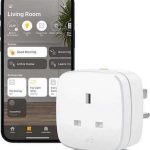
Which assistant you already talk to matters more than any feature on the box. Only a few plugs work with Alexa, Google Home and Apple Home together, and a plug that won't join your routines ends up as a glorified timer. The app comes next, since schedules are what you'll use every day.
Energy monitoring and a power strip are worth the extra only when you'll use them. We run plugs on lamps and outdoor lights at home and in our Airbnbs, and the seven below cover Wi-Fi plugs, a hub-based plug and a smart strip.
How We Tested These Smart Plugs
We use smart plugs in our personal homes and the Airbnbs we manage, switching lamps, outdoor lights and anything else we want to control without being there. They take minutes to set up, and the app is what separates a plug you'll use every day from one you'll forget about.

The garage photo shows how far you can take it. Three plugs run the outdoor lighting at one of our Airbnbs, so we can switch it on when guests are staying and off when the building is empty, and there's no practical limit to how many plugs one app will handle.
Every plug was judged on the same points:
- Set-up: How quickly it joined the network and appeared in the app
- App: How easy the schedules, timers and routines are to find and change
- Connection: Whether it stayed online at a distance from the router
- Hub: Whether it needs one, and what that adds to the cost
- Build: How solid it feels and how much of the socket it covers
- Voice control: Which assistants it works with


This short clip from our testing shows how quickly a plug responds when you switch it from the app:
Let Us Show You How Easy Smart Plugs Are To Use - (Testing The Best Smart Plugs) #shorts
For plugs we haven't lived with for long, we've taken features and compatibility from the brand and said so. Warranty and price round out the picture.
The Best Smart Plugs We Recommend
All seven plugs below fit standard UK sockets. We've flagged the one that needs a hub and the ones tied to a single voice assistant.
Best Overall
Meross Smart Mini Plug

Best for: Homes using Alexa, Google Home or Apple Home that want one plug for all
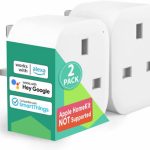
Check Price On AmazonWe've got several Meross Mini Plugs around our own house, and the first thing you notice is how little of the socket they take up. On a double socket it leaves the second outlet free, which plenty of bulkier plugs don't. Meross says its 6.1 x 5.1 x 3.3 cm body makes it one of the thinnest on sale.
It works with Alexa, Google Home and Apple HomeKit, so it fits whichever voice assistant you already have. In the Meross app you can set schedules, and the routines and scenes were the feature we enjoyed most while testing. Meross also builds in an offline mode, and says its schedules and timers keep running if your internet connection drops. Getting each plug into the app takes very little effort, which helps when you're adding them a few at a time.
What we like
- Slim enough to leave the neighbouring outlet free
- Works with Alexa, Google Home and Apple HomeKit
- Routines and scenes in the Meross app
- Offline mode for when the internet goes down
- Quick set-up in the brand's app
- Meross claims a longer Wi-Fi range than standard plugs
What to know
- Costs more than the TP-Link Tapo or Nooie plugs
Our verdict
The Meross covers more bases than anything else here. It shares a double socket without a fight, talks to all three major voice assistants and keeps working from the app when the broadband drops, so it suits almost any home. Price is the only real mark against it. If you're putting a plug in every room, the TP-Link Tapo Smart Plug keeps the bill down.
Best Alexa
Amazon Smart Plug

Best for: Households already running Echo speakers and the Alexa app
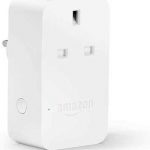
Check Price On AmazonAmazon's own plug is built for one job, which is adding a switchable socket to an Alexa home. It plugs into any UK socket and sets up inside the Alexa app, so there's no separate brand app or account to deal with. The photo above shows it standing beside its box.
Once it's set up you can switch it by voice, through the Alexa app or with the manual button, and an LED shows whether it's on. Schedules and routines are built into Alexa, so the plug can join routines with your other Alexa devices.
Because it only works with Alexa, it's the wrong pick for a Google or Apple home. It's also chunky, and it doesn't look as smart as the Hive plug.
What we like
- Sets up inside the Alexa app with no extra account
- Manual on and off button
- LED status light
- Schedules and routines through Alexa
What to know
- Only works with Alexa
- Bulky body covers more of the socket than the Meross
Our verdict
Echo households get the simplest set-up of the lot, because the plug lives inside the Alexa app and joins your existing routines straight away. That single-assistant design cuts both ways. Switch to Google or Apple later and the plug stays tied to Alexa, so think about where your smart home is heading before you buy.
Best Value
TP-Link Tapo Smart Plug

Best for: First-time smart plug buyers wanting schedules and an away mode cheaply
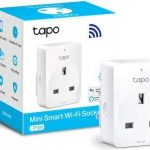
Check Price On AmazonTP-Link is best known for its routers, and the Tapo is its cheap, compact way into smart plugs. It needs no hub and runs from the Tapo app on a phone or tablet, with Alexa and Google Assistant support for voice control.
Scheduling is simple to set up in the app. The feature that sets it apart at this price is away mode, which switches the plug on and off at varied times so a lamp makes the house look lived in while you're away. The body is compact enough to sit comfortably in a UK double socket.
It doesn't feel as solid in the hand as the premium plugs, but for lamps and fans that hardly matters.
What we like
- No hub needed
- Works with Alexa and Google Assistant
- Easy scheduling in the Tapo app
- Away mode for a lived-in look
- Compact body for UK sockets
What to know
- Build feels lighter than the Meross or Hive plugs
- Voice control limited to Alexa and Google Assistant
Our verdict
The TP-Link Tapo Smart Plug suits anyone trying smart plugs for the first time or kitting out a whole house on a budget. Away mode makes it a good holiday plug. If you use Apple Home, go for the Meross Smart Mini Plug, and if you need four at once the Nooie pack is the other budget route.
Best Smart Extension
TP-Link Kasa WiFi Power Strip

Best for: Desks and TV corners with several devices to switch separately
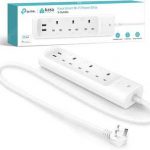
Check Price On AmazonThe Kasa strip is the answer when you want to control several things in one place, such as a TV, games console and lamp in the corner of a living room. It has three sockets that you can control separately in the Kasa app, along with two USB ports for charging.
TP-Link has built in surge protection too, which is welcome for a TV or computer. Our round-up of the best surge protected extension leads explains why that matters for expensive electronics. It needs no hub, works with Alexa and Google Assistant and has the same schedules and timers as the single plugs.
It costs more than one smart plug, but it's tidier and cheaper than three plugs stacked on an extension lead.
What we like
- Three sockets controlled separately
- Two USB charging ports
- Surge protection for TVs and computers
- No hub needed
- Works with Alexa and Google Assistant
- Schedules and timers in the Kasa app
What to know
- Costs more than a single smart plug
Our verdict
One strip in place of three plugs is the real selling point. Behind a TV unit or on a desk, it gathers everything onto one tidy lead, lets you switch each socket on its own and has surge protection looking after the electronics. It's more than you need for a single lamp, where a TP-Link Tapo Smart Plug does the job for less.
Best Energy Monitoring
Eve Energy UK Smart Plug

Best for: Apple Home users who want to track what their appliances cost to run
Check Price On AmazonEnergy monitoring is the reason to choose the Eve Energy plug. The Eve app tracks how much power the appliance uses and gives you projected running costs, which is handy for checking what an old fridge freezer or a tumble dryer really costs you.
It needs no hub and Eve doesn't ask you to register an account or hand over personal details, which plenty of people will appreciate. It works with Siri and Apple Home, and the app has the usual schedules, with several modes to choose from, plus remote control.
Check the phones in your house before you buy, because Eve builds around Apple first and Android households get less out of it.
What we like
- Tracks power use and projected running costs
- No hub and no account registration
- Works with Siri and Apple Home
- Clear, easy-to-use app
- Schedules with several modes
What to know
- Costs more than plugs without energy monitoring
- Built around Apple Home, so less suited to Android households
Our verdict
Choose the Eve Energy for the numbers. Tracking an old fridge freezer or tumble dryer and seeing a projected running cost in the app is what earns it a place here, and there's no account to register. Check your household runs on Apple first, as that's where it fits best.
Best Value Runner-Up
Nooie Smart WiFi Plug

Best for: Kitting out several rooms at once on a tight budget
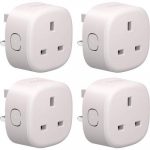
Check Price On AmazonNooie sells its smart plugs as a pack of four, which makes it a cheap way to put smart control into several rooms at once. Each plug runs from Nooie's free app with no hub, and they work with Alexa and Google Assistant.
You get the schedules and timers that cover most smart plug jobs, such as lamps in the evening or a fan at night. The plugs carry ETL certification, and set-up in the app is straightforward.
The only real drawback is that you can't buy one on its own. If you only need a single plug, the pack works out as poor value. For a rental, a new home or several lamps, four in the box is exactly what you want.
What we like
- Four plugs in one pack
- ETL certified
- No hub needed
- Works with Alexa and Google Assistant
- Schedules and timers in a free app
What to know
- Only sold as a pack of four
Our verdict
For kitting out a whole house cheaply, a four-pack is hard to argue with. Each Nooie plug covers lamps and fans with simple schedules and timers, and there's no hub to buy. The catch shows up when you need just one, because they aren't sold singly, and the TP-Link Tapo makes more sense then.
Most Aesthetically Pleasing
Hive Active Smart Plug

Best for: Homes already running a Hive hub or Hive thermostat
Check Price On AmazonHive is best known for its smart thermostats for UK heating, and its smart plug runs in the same app. We use one to control the outdoor lights at the front of one of our houses, set to come on early in the morning and again in the evening, and our guide to how a smart plug works shows that schedule in the Hive app.
The app lets you set up to six time slots a day and override them whenever you like. There's a button on the front for switching it by hand, and it works with Alexa. It's also the neatest-looking plug in this list and sits quietly in a living room.
You need the Hive hub to use it, which plugs into the back of your router. That's no extra cost if you already have Hive heating, but it adds up if you don't.
What we like
- Up to six schedule slots a day
- Manual button on the front
- Works with Alexa
- Sold as a single plug or in packs of four or five
- Neat design that looks at home in a living room
- Shares the Hive app with Hive heating
What to know
- Needs the Hive hub, an extra cost if you don't already have Hive heating
Our verdict
Buy the Hive Active Smart Plug if you already have a Hive hub or thermostat, as it slots straight into the app you use for your heating. Without Hive, the hub makes it an expensive choice, and the Meross Smart Mini Plug or TP-Link Tapo Smart Plug do the same job without one.
What To Look For In A Smart Plug
Most smart plugs switch a socket on and off from your phone, so the differences come down to how they connect, which assistants they talk to and the extras in the app. Get those right and you'll use the plug every day. Get them wrong and you end up with a plug that needs its own app and never joins your routines.
Wi-Fi Or Hub
Most plugs join your Wi-Fi directly and need nothing else. Hive and a few other systems connect through a hub that plugs into your router. A hub-based plug makes sense when you already own the hub, for example with smart radiator valves or a thermostat from the same brand, because everything sits in one app.
Check the signal where the plug will live. A garage, garden office or far bedroom can sit at the edge of your router's range, and a plug that keeps dropping offline quickly becomes a nuisance.
Voice Assistant And App
Match the plug to the assistant you already use. Alexa, Google Home and Apple Home each support different brands, and only a few plugs, such as the Meross, work with all three. The app matters just as much, as that's where you build schedules, so a clear app with routines is worth paying a little more for.
Schedules And Away Modes
Scheduling is the feature that earns a smart plug its place. It's what turns outdoor wall lights on at dusk and off at bedtime without anyone touching a switch. Away modes vary the times a lamp comes on while you're on holiday, and timers switch something off after a set period, which is ideal for fans and electric blankets.
Energy Monitoring
Plugs with energy monitoring show how much power an appliance uses and, on some, what it costs to run. It's a good way to find the appliances costing you most, such as an old fridge or a dehumidifier left on all day. You pay a little more for it, so skip it if you only want lights on a timer.
Size And Load Rating
Bulky plugs can block the second outlet on a double socket, which is a real annoyance behind a TV. Slim designs like the Meross leave room for a neighbouring plug. Check the maximum load the brand lists before plugging in heaters or other high-power appliances, and use a smart power strip when you want to control several devices in one spot.
Smart Plug Questions Answered
Do smart plugs need a hub?
Most smart plugs don't need a hub and connect straight to your home Wi-Fi, including the Meross, TP-Link Tapo, Nooie and Amazon plugs. Hive plugs are the exception in our list, as they connect through the Hive hub plugged into your router. A hub only makes sense if you already have one for heating or other devices from the same brand.
Can a smart plug be used outside?
Standard smart plugs are for indoor use only and shouldn't be plugged into an outdoor socket where rain can reach them. To control garden or outdoor lights, put the smart plug in an indoor socket or a garage, as we do at one of our Airbnbs, and run the lights from it. Outdoor-rated smart plugs exist for sockets that are exposed to the weather.
What appliances should not go on a smart plug?
Avoid putting heaters, kettles and other high-power appliances on a smart plug unless the plug's maximum load covers them. Appliances that need a button pressed to start, such as most washing machines, won't come on when the plug switches. Fridges and freezers are also best left off timers, as cutting their power by mistake spoils food.
Will a smart plug work if the internet goes down?
Most smart plugs still work by hand with their button when the internet goes down, but app and voice control stop on most models. The Meross Smart Mini Plug has an offline mode that keeps app control working over your home network. Schedules keep running on some plugs and stop on others, depending on whether they're stored on the plug or in the cloud.
Which smart plug do you use most at home?
The Meross Smart Mini Plug gets the most use, as we've got several around our own house. What keeps us buying them is the slim body, which never blocks the other half of a double socket, and the routines and scenes in the Meross app, which were our favourite feature while testing.
Is the Meross Smart Mini Plug worth paying more for than the TP-Link Tapo Smart Plug?
It's worth it if you use Apple Home or want app control to keep working when the internet drops, as Meross works with Apple HomeKit and builds in an offline mode. The TP-Link Tapo Smart Plug costs less and adds an away mode, but its voice control is limited to Alexa and Google Assistant.
How do you run outdoor lights at your Airbnb with smart plugs?
The plugs live in the garage, where they're out of the weather, and each one feeds a run of outdoor lighting. When guests are booked in we switch the lights on from the app, and when the place is empty they go off. Adding more plugs later is easy, as one app handles as many as you need.
Is the TP-Link Kasa WiFi Power Strip better than three separate plugs?
Yes, where everything sits in one corner. A TV, games console and lamp on the TP-Link Kasa WiFi Power Strip cost less and look tidier than three smart plugs crammed onto an extension lead, and you still switch each socket separately. You also get two USB ports and surge protection thrown in. For a single lamp, the TP-Link Tapo Smart Plug is the cheaper answer.
Which Smart Plug We'd Choose
The Meross Smart Mini Plug is the one we'd put in most homes. It leaves room on a double socket, it isn't fussy about which assistant you use and its offline mode keeps it useful when the broadband drops. On a budget, the TP-Link Tapo Smart Plug gets you schedules and an away mode for less.
Hive owners should stick with the Hive Active Smart Plug, and the TP-Link Kasa WiFi Power Strip is the tidy choice for a desk or TV corner.
Richard has spent years renovating properties and turning them into rentals and Airbnbs. Like a lot of people he started out as a beginner, and these days there isn't much DIY he won't take on.