How Does A Smart Thermostat Work?
We walk through each part behind a smart thermostat using the Hive kit we installed recently.
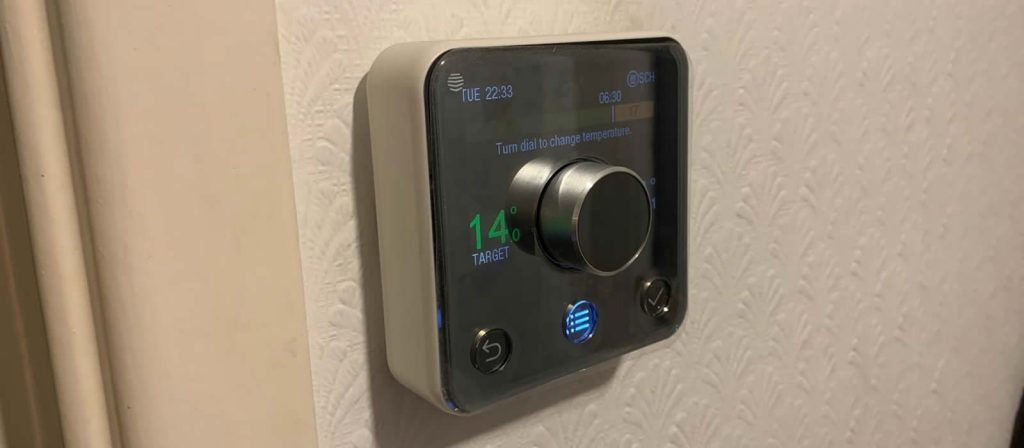
The short answer
A smart thermostat works by connecting your boiler to the internet. A hub plugged into your router talks wirelessly to the thermostat on the wall and to a receiver wired to the boiler, which switches the heating on and off. Because the hub is online, you can change the temperature and schedule from a phone app or a voice assistant wherever you are.
Smart thermostats have come down in price and are now a common upgrade in UK homes, but the way they connect to a boiler isn't obvious if you've only ever used a dial or a simple programmer. Once you see the parts laid out, it's a straightforward setup.
We've used the Hive Active Heating system to explain it. It's the one we installed most recently and among the smart thermostats we rate highest, with a clean design and an app that's easy to find your way around. Other brands differ in the details, but most follow the same pattern of hub, receiver and thermostat.
What Makes A Thermostat Smart
A standard room thermostat measures the temperature and tells the boiler to fire up or switch off. A programmer adds set times. A smart thermostat does both, then puts the controls on your phone so you can turn the heating up on the way home, change the schedule from work or switch it off if you've gone away and forgotten.
Most also link with other smart devices, which lets you control individual radiators, ask a voice assistant to change the temperature or set the heating to react when you leave the house.
How Do Smart Thermostats Work?
The diagram below shows how the parts of a smart thermostat connect to each other, from the router to the boiler. The arrows show which way the signals travel.

The Hub
The hub is what puts your heating online. On the Hive system it plugs into your broadband router with an Ethernet cable, and it talks wirelessly to the thermostat and receiver from there.
If you already have a Hive hub running other Hive devices, such as their smart plugs or lights, you won't need a second one. A single hub handles several devices at once.
Connecting The Receiver To The Boiler
The receiver is the part that actually switches the boiler. It takes instructions from the hub and turns the heating on or off to match.
If your boiler already had a programmer or programmable thermostat, the wiring the receiver needs is likely in place. In the photo below, the wiring connections under the boiler are outlined in red. If they aren't already there, this is the one part of the job to hand over to a qualified electrician or heating engineer.

With the wiring in place, the receiver fits onto its backplate, outlined in blue. There are two receivers in this installation, because one controls the radiators and the other runs our underfloor heating system.
Pairing The Thermostat With The Receiver
Setting up the receivers takes the longest. After that, pairing the thermostat is just a case of following the steps in the Hive app.
Some receivers run a firmware update when they first power up and won't pair until it has finished. Watch the light on the front, as its colour and flashing pattern tell you what the receiver is doing, and the app or manual explains what each one means.
Once it's paired, test that the boiler responds. Try a manual boost, turn the temperature up and down, and set a simple schedule to check the heating comes on at the times you've chosen.
Linking Other Smart Devices
Most smart thermostats work with Amazon Alexa, Google Assistant and Apple HomeKit, and many also connect to IFTTT for automations. That means you can say "Alexa, set the heating to 21 degrees for 3 hours" or have the heating turn down automatically when everyone has left.
How Easy Is A Smart Thermostat To Use
Plenty of people worry that a smart thermostat will be too fiddly if they aren't into gadgets. In practice, the thermostat on the wall works much like any other, with a dial to turn the temperature up or down. On most smart thermostats, the everyday changes like a boost or a nudge to the temperature take a tap or two in the app.
In the video below, from our YouTube channel, we change the temperature in the Hive app and the receiver by the boiler picks up the new setting.
Controlling Your Heating Has Never Been So EASY! - Testing Out The Latest Smart Thermostats #shorts
The same app controls our smart radiator valves, so we can set each room to its own temperature without walking round the house turning valves.
Is A Smart Thermostat Worth It
A smart thermostat costs more than a basic programmer, so the value comes from how you use it. If your days vary, you're away a lot or you manage a property remotely, being able to control the heating from your phone stops you heating an empty house. For a holiday let, that means turning the heating down between guests and warming the place up again before the next check-in. If you're home all day on a fixed routine, a standard programmer and thermostatic radiator valves do much the same job for less.
Think long term when you choose a brand. If you plan to add smart plugs, lights or radiator valves later, picking a thermostat from the same family keeps everything in one app. The same thinking applies to how smart plugs work alongside your heating.
What People Also Ask Us
Does a smart thermostat need Wi-Fi to work?
A smart thermostat needs an internet connection for the app, remote control and voice assistants, but most keep running the heating if the Wi-Fi drops. The thermostat and receiver talk to each other directly, so your schedule and the controls on the wall carry on working. You just can't change anything from your phone until the connection returns.
Can I fit a smart thermostat myself?
You can fit a smart thermostat yourself if your boiler already has a programmer or wired thermostat, as the receiver connects to the existing wiring. Plugging in the hub and pairing the thermostat through the app is simple. If new wiring to the boiler is needed, use a qualified electrician or heating engineer.
Does a smart thermostat work with any boiler?
Smart thermostats work with most combi, system and conventional gas and oil boilers in UK homes. Each brand publishes a compatibility checker, so enter your boiler model before you buy. Some systems with heat pumps or unusual wiring need a specific model or professional installation.
Can a smart thermostat control underfloor heating?
A smart thermostat can control wet underfloor heating, as long as it has its own receiver or zone connection. In our Hive installation, one receiver runs the radiators and a second runs the underfloor heating, both from the same app. Electric underfloor heating needs a thermostat rated for the load or a compatible switch.
Do I need a second hub if I already have other Hive devices?
No, a single Hive hub handles several devices at once. If you already run Hive smart plugs or lights, the hub that's plugged into your broadband router with an Ethernet cable also talks to the thermostat and receiver. You only need the one.
Why does your Hive installation have two receivers?
Each receiver switches one heating circuit. Ours has one for the radiators and a second for the underfloor heating. The photo in the guide shows both beside the boiler, outlined in blue, with the wiring connections underneath outlined in red.
Is a smart thermostat worth it if I'm home all day on a fixed routine?
No. With a fixed routine at home, a standard programmer and thermostatic radiator valves do much the same job for less. The extra cost of a smart thermostat pays off when your days vary, you're away a lot or you manage a property remotely.
What's the slowest part of setting up a smart thermostat?
The receivers take the longest. Some update their firmware the first time they power up and won't pair until that's done, so keep an eye on the light on the front, which changes colour and flashing pattern to show what's going on. Once the receivers are ready, pairing the thermostat is a matter of following the Hive app.
Richard has spent years renovating properties and turning them into rentals and Airbnbs. Like a lot of people he started out as a beginner, and these days there isn't much DIY he won't take on.